What is Java ?
Java is a programming language and computing platform first released by Sun Microsystems in 1995.
why do I need it?
There are lots of
applications and websites that will not work unless you have Java
installed, and more are created every day. Java is fast, secure, and
reliable. From laptops to datacenters, game consoles to scientific
supercomputers, cell phones to the Internet, Java is everywhere!
Why Java Is Important to the Internet??
The Internet helped catapult Java to the forefront of programming, and Java, in turn,has had a profound effect on the Internet. The reason for this is quite simple: Java expands the universe of objects that can move about freely in cyberspace. In a network, two very broad categories of objects are transmitted between the server and your personal computer: passive information and dynamic, active programs.
The Java Buzzwords
No discussion of the genesis of Java is complete without a look at the Java buzzwords.
Although the fundamental forces that necessitated the invention of Java are portability
and security, other factors also played an important role in molding the final form of
the language. The key considerations were summed up by the Java team in the
following list of buzzwords:
■ Simple
■ Secure
■ Portable
■ Object-oriented
■ Robust
■ Multithreaded
■ Architecture-neutral
■ Interpreted
■ High performance
■ Distributed
■ Dynamic
Two of these buzzwords have already been discussed: secure and portable. Let’s examine what each of the others implies.To be Continue ....
There are lots of applications and websites that will not work unless you have Java installed, and more are created every day. Java is fast, secure, and reliable. From laptops to datacenters, game consoles to scientific supercomputers, cell phones to the Internet, Java is everywhere!
No discussion of the genesis of Java is complete without a look at the Java buzzwords.
Although the fundamental forces that necessitated the invention of Java are portability
and security, other factors also played an important role in molding the final form of
the language. The key considerations were summed up by the Java team in the
following list of buzzwords:
■ Simple
■ Secure
■ Portable
■ Object-oriented
■ Robust
■ Multithreaded
■ Architecture-neutral
■ Interpreted
■ High performance
■ Distributed
■ Dynamic
Two of these buzzwords have already been discussed: secure and portable. Let’s examine what each of the others implies.To be Continue ....




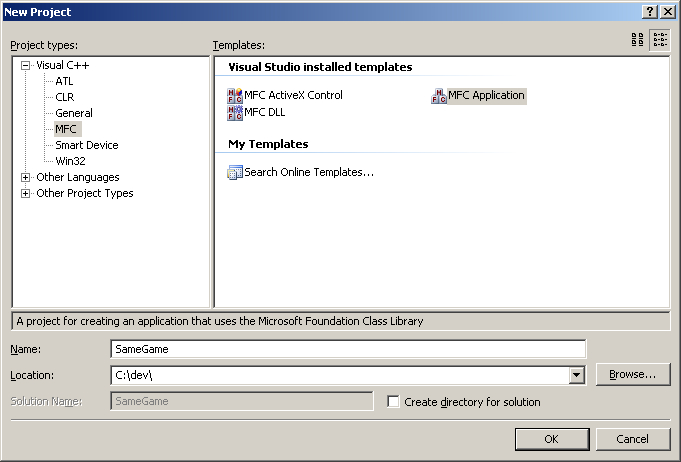 Next
the MFC application wizard will appear. If you do not choose the name
SameGame, then the names of your classes will be slightly different than
those that appear in this article. This allows you to select quite a
few options that the resulting generated code will include. For our
simple game we can disable quite a few of these options. The following
graphics show which options to select in order to get the project just
the way we want it.
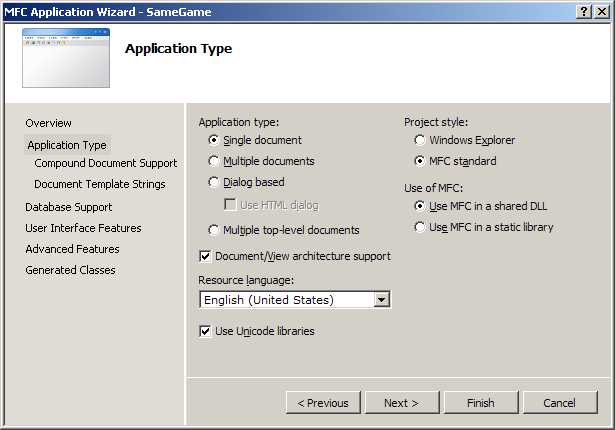 Selecting
"Single document" allows the application to use the document/view
architecture when multiple documents aren't necessary. The last setting
of interest on this page is "Use of MFC". The two options are for a
shared DLL or as a static library. Using a DLL means that your users
must have the MFC DLLs installed on their computer, which most computers
do. The static library option links the MFC library right into your
application. The executable that is produced will be larger in size but
will work on any Windows machine.
 (If
you are using Visual 2010, this screen does not have a "None" option
for Toolbars. Just choose "Use a Classic Menu" without checking either
toolbar.) A thick frame allows the user to resize the window. Since our
game is a static size, un-check this option. A maximize box isn't
needed, nor is a status bar or a toolbar. Advancing to the next page
will bring you to the "Advanced Features" page.
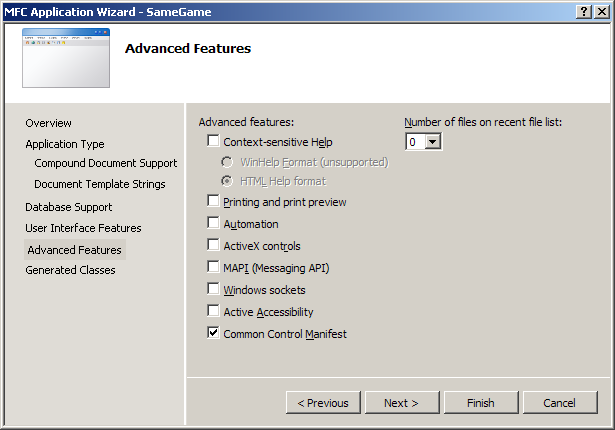 Turn
off printing, ActiveX controls and set the number of recent files to
zero. Since we won't actually be loading any files, this option won't
be necessary. The last page of the MFC Application Wizard presents you
with a list of generated classes.
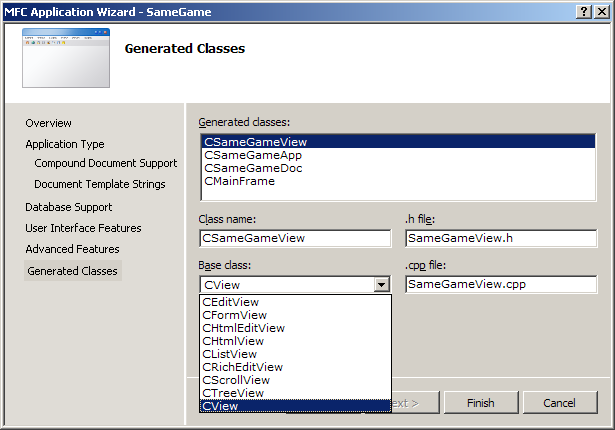 Four
classes that will be generated for you are the basis for the game. The
first on the list is the view class, here it is called CSameGameView. I
will come back to this class in a minute. The next class in the list
is the application class. This class is a wrapper for the entire
application and a main function is provided for your application by this
class. The base class isn't selectable and must be CWinApp.
 Notice
it has a default menu (File, Edit and Help) and an empty client area.
Before we get to actual coding I'd like to explain a little about the
document/view architecture that is used in MFC applications and how we
are going to apply it to our game.


